Mega Photo: Difference between revisions
m →Page 6 |
mNo edit summary |
||
| Line 2: | Line 2: | ||
[[Category:Programs]] | [[Category:Programs]] | ||
{{ | {{WIP|REASON=Finish remaining effect descriptions. Convert to a table?}} | ||
[[File:Megaphoto appicon.png|thumb|right]] | |||
'''Mega Photo''' a mobile application for iOS and Android that specializes in video effects and filters. Containing over a thousand different filters, many of which were quite advanced for its time, Mega Photo quickly became a staple in the mobile [[Tennis]] community in the late 2010's. Many of its filters were unique to the program or had a very specific telltale style to them, causing its usage to be easily spotted. | '''Mega Photo''' a mobile application for iOS and Android that specializes in video effects and filters. Containing over a thousand different filters, many of which were quite advanced for its time, Mega Photo quickly became a staple in the mobile [[Tennis]] community in the late 2010's. Many of its filters were unique to the program or had a very specific telltale style to them, causing its usage to be easily spotted. | ||
Latest revision as of 02:45, 23 March 2026
 | This article is a work in progress! Not all important information is present yet. Come back soon! Reason: Finish remaining effect descriptions. Convert to a table? |

Mega Photo a mobile application for iOS and Android that specializes in video effects and filters. Containing over a thousand different filters, many of which were quite advanced for its time, Mega Photo quickly became a staple in the mobile Tennis community in the late 2010's. Many of its filters were unique to the program or had a very specific telltale style to them, causing its usage to be easily spotted.
Usage
Mega Photo is very similar in functionality to Apple's Photo Booth app.
Footage can either be taken directly from the camera as well as from the camera roll. Many effects are also interactive; you can click and drag to change what an effect does (unfortunately this is the only way to change things as effect parameterization does not exist).
Effects
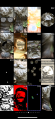
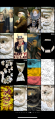
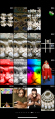
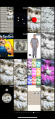
On an iPhone, Mega Photo's effects are split 4x4 across 13 pages, with each effect having "sub-effects", or variants that change what they do. Some effects are only applicable for video files and won't appear for photos. Each of these sub-effects are labeled in the official count, but only appear within their category, resulting in supposed "gaps" in the list.
On Android, the app functions somewhat differently; there are less effects overall, and each slide has a "default" view in the center.
All 1,169 effects can be seen below.
-
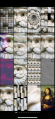 Page 1
 -
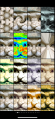 Page 2
 -
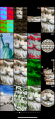 Page 3
 -
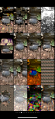 Page 4
 -
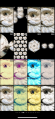 Page 5
 -
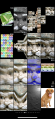 Page 6
 -
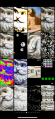 Page 7
 -
 Page 8
 -
 Page 9
 -
 Page 10
 -
 Page 11
 -
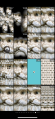 Page 12
 -
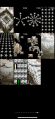 Page 13


The following sections will go screen by screen explaining what each section does.
Page 1
- A mosaic of the footage using the footage itself tinted different colors.
- Various dithering effects, including Floyd-Steinberg and Halftone.
- A 3D vortex, similar to the one present in Wax.
- An animated sliding puzzle. Goes automatically but can also be controlled.
- A rainbow filter.
- VIDEO ONLY - Motion Blur.
- Pixel Mosaic filter.
- "Glass" filter.
- Various duotone filters.
- VIDEO ONLY - A "reference frame" is saved and after a short bit of time that frame flashes on the screen, creating a very jerky effect.
- An infinitely scrolling tile pattern.
- Emboss filter.
- An animated "smear" effect that can be controlled with your finger.
- A recursive rotation algorithm, that splits the footage into blocks before pinwheel sliding each one. This is done repeatedly until the image is rotated 90%.
- The footage zooms in and out.
- A cutout-effect of the Mona Lisa.
Page 2
- Kaliedescope filter.
- Swirl filter
- Punch/Spherize filter.
- A variant of the "negative" filter, where colors are inverted and tinted monochrome.
- Pinch filter.
- Various high contrast color filters, including "infared" (#143) and one that uses a pattern of red, green, yellow blue and black (#158).
- Mirror filter.
- Light Rays and other similar warps.
- The remaining eight on this page (#186-#251) are film tints of various colors.
Page 3
- 2x2 heavily tinted footage, similar in style to Andy Warhol's "Pop Art".
- Another infinitely tiling mosaic of footage, however this variant also infinitely zooms out into itself before repeating.
- 3D plane rotation of the footage. Available in various 2D shapes.
- Water ripple effect.
- Cut-Out of the Statue of Liberty.
- Two effects - a "strobe light" between a invert filter (#258) and just the invert filter (#259).
- Recoloring of footage similar to that of Barack Obama's "Hope" posters, using during his campaign.
- Pseudo-3D sphere of infinite tiles.
- More pixel mosaic effects.
- Another, smaller pinch effect.
- "Night Vision" - or the negative filter tinted green and black.
- A flurry of the footage move across the screen, some tinted different colors. You can click and drag to individually move them back and forth, or stop them in place.
- Cut-Out of Mount Rushmore.
- Edge Detection filter.
- A very light tint of various colors.
- Another pseudo-3D sphere of tiles, however more emphasized and non-scrollable.
Page 4
- Posterize filters.
- An effect similar to Boris Sapphire's S_TileScramble, footage is cut up and fragmented. Each fragment can be moved with the finger.
- Wave Warp Filters.
- More edge detection filters.
- A 3D cube, with each face containing the footage with a different filter applied. One of the more well known filters.
- Adds a magnifying glass to the screen that can be moved around.
- Splits the footage into slices that can be moved around. Moves around automatically by default.
- Adds a "mosaic censor" to the screen.
- Creates radial slices of a certain point overlaid across the rest of the footage.
- Variation of the recursive rotation filter that goes 1x2 instead of 2x2.
- Increases the footage's saturation.
- Non-interactive infinite tiles that gradually get smaller and smaller before resetting.
- Fractal warps.
- More dither patterns.
- Halftone dithering.
- Chromatic aberration.
Page 5
- Adds animated "twinkles" to the footage.
- Maps the footage onto "bubbles" that can be popped.
- "Hall of Mirrors" type effects.
- Creates patterns of circular copies of the footage overlaid over the original, that move around.
- Similar to the moving planes effect but with rolling circles instead.
- Infinitely tiling circles.
- Kaleidoscopic hexagon, with "exploding" variants.
- Two circle copies of the footage, almost like a looking through a mask.
- The final eight filters on this page (#389-#795) are all film tints, albeit slightly more dramatic than the ones on page 2.
Page 6
- A Rubik's Cube that slowly solves itself, another one of the more well known filters.
- Gradually changes from full color to monochrome and back.
- Tiles of the footage float past the camera.
- The footage is cut into pieces that freeze in place before moving to the next position.
- An interactive Bejeweled-like game.
- An effect very similar to the Maze screensaver from Windows 9X.
- Posterized footage with black scanline-like lines as well.
- (?)
- Stained Glass or Voronoi effect.
- A minimax filter of equal horizontal and vertical proportion.
- An effect similar to Pixelan CreativEase's StepMotion/StepTime effects, where the different between the current and previous frames either have a blue tint (#827) or are differenced together.
- An interactive game of Breakout.
- More interactive water ripples.
- More wavy/hall of mirrors filters, that also move slowly.
- Similar to an emboss effect, but with a light source that moves around lighting up edges.
- Cut-Out of a dog (specifically, a Labrador).
Page 7
- Radial mosaic distortions.
- A very heavy posterize effect that gradually darkens and lightens on repeat.
- Cut-Out of the Sphinx of Egypt.
- More minimax filters.
- Screen pixels gradually change position, blurring the image. Use your finger to "clean them up".
- Interactive Fruit Ninja-like game.
- Heavy whirling effect that goes back and forth in each direction.
- Footage is made up of large dots that move around the screen.
- Similar to the high contrast color filters of page 2, however they cycle through their colors rather than remaining static.
- The footage is tinted based on the color of a pixel clicked on.
- Cut-Out of an art museum, with the footage (with various effects applied) on each painting.
- Interactive game of Space Invaders.
- Yet another whirl effect, which can be dragged across the screen.
- Analog TV static filters.
- The footage is keyed out to a specific color which gradually changes.
- 3D I-shaped cylinder that contains looping copies of the footage. Another well known effect.
Page 8
Page 9
Page 10
Page 11
Page 12
Page 13
- An extension of the Vortex effect (#10), but with other shapes like a square and hexagon.
- A starfield background with star copies of the footage dancing in unison across the screen in a circular pattern.
- Similar to above, but with more complex patterns.
- Infinitely tiling shapes, with a starfield background.
- Same as above, but with a 3D tilt.
- Various shapes float across the screen (starfield background).
- Same as above, but the shapes float towards the camera rather than across.
- "Glow" filter (?)
- (?)
- 4x5 card matching game. Footage is the same for each tile, correct guesses are based on the tinted color.
- Diagonal shards of the center of the footage.