Mega Photo: Difference between revisions
| Line 69: | Line 69: | ||
==Page 3== | ==Page 3== | ||
* 2x2 heavily tinted footage, similar in style to Andy Warhol's "Pop Art". | |||
* Another infinitely tiling mosaic of footage, however this variant also infinitely zooms out into itself before repeating. | |||
* [[3D]] plane rotation of the footage. Available in various 2D shapes. | |||
* Water ripple effect. | |||
* Cut-Out of the Statue of Liberty. | |||
* Two effects - a "strobe light" between a invert filter (#258) and just the invert filter (#259). | |||
* Recoloring of footage similar to that of Barack Obama's "Hope" posters, using during his campaign. | |||
* Pseudo-3D sphere of infinite tiles. | |||
* More pixel mosaic effects. | |||
* Another, smaller pinch effect. | |||
* "Night Vision" - or the negative filter tinted green and black. | |||
* A flurry of the footage move across the screen, some tinted different colors. You can click and drag to individually move them back and forth, or stop them in place. | |||
* Cut-Out of Mount Rushmore. | |||
* [[Edge Detection]] filter. | |||
* A very light tint of various colors. | |||
* Another pseudo-3D sphere of tiles, however more emphasized and non-scrollable. | |||
==Page 4== | ==Page 4== | ||
==Page 5== | ==Page 5== | ||
Revision as of 04:28, 15 March 2026
 | This article is a stub! It is missing critical information, likely just standing ground until it is completed later. Come back soon! Reason: Convert into a table and get descriptions of each effect, if possible. |
Mega Photo is a video filter tool that can add effects to photos and videos on mobile devices. It can also grab directly from the camera!
Mega Photo was one of the first programs to be used for mobile Tennis, often by those who didn't have access to computer software. However the power of the program cannot be overlooked, due to its very large collection of plugins (over a thousand!) of which most are unique and cannot be found in other editors, including PC ones.
Usage
Mega Photo is very similar in functionality to Apple's Photo Booth app.
Footage can either be taken directly from the camera, or photos or video from the camera roll.
Effects
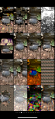
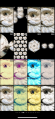
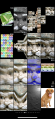
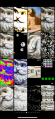
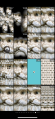
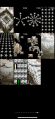
On an iPhone, Mega Photo's effects are split 3x4 across 13 pages, with each effect having "sub-effects", or variants that change what they do. Some effects are only applicable for video files and won't appear for photos. Each of these sub-effects are labeled in the official count, but only appear within their category, resulting in supposed "gaps" in the list.
On Android, the app functions somewhat differently; there are less effects overall, and each slide has a "default" view in the center.
All 1,169 effects can be seen below.
-
 Page 1
 -
 Page 2
 -
 Page 3
 -
 Page 4
 -
 Page 5
 -
 Page 6
 -
 Page 7
 -
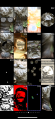 Page 8
 -
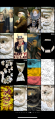 Page 9
 -
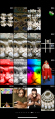 Page 10
 -
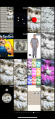 Page 11
 -
 Page 12
 -
 Page 13


The following sections will go screen by screen explaining what each section does.
Page 1
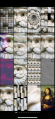
- A mosaic of the footage using the footage itself tinted different colors.
- Various dithering effects, including Floyd-Steinberg and Crosshatch.
- A 3D vortex, similar to the one present in Wax.
- An animated sliding puzzle. Goes automatically but can also be controlled.
- A rainbow filter.
- VIDEO ONLY - Motion Blur.
- Pixel Mosaic filter.
- "Glass" filter.
- Various duotone filters.
- VIDEO ONLY - A "reference frame" is saved and after a short bit of time that frame flashes on the screen, creating a very jerky effect.
- An infinitely scrolling tile pattern.
- Emboss filter.
- An animated "smear" effect that can be controlled with your finger.
- A recursive rotation algorithm, that splits the footage into blocks before pinwheel sliding each one. This is done repeatedly until the image is rotated 90%.
- The footage zooms in and out.
- A cutout-effect of the Mona Lisa.
Page 2
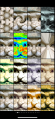
- Kaliedescope filter.
- Swirl filter
- Punch/Spherize filter.
- A variant of the "negative" filter, where colors are inverted and tinted monochrome.
- Pinch filter.
- Various high contrast color filters, including "infared" (#143) and one that uses a pattern of red, green, yellow blue and black (#158).
- Mirror filter.
- Light Rays and other similar warps.
- The remaining eight on this page (#186-#251) are film tints of various colors.
Page 3
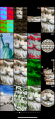
- 2x2 heavily tinted footage, similar in style to Andy Warhol's "Pop Art".
- Another infinitely tiling mosaic of footage, however this variant also infinitely zooms out into itself before repeating.
- 3D plane rotation of the footage. Available in various 2D shapes.
- Water ripple effect.
- Cut-Out of the Statue of Liberty.
- Two effects - a "strobe light" between a invert filter (#258) and just the invert filter (#259).
- Recoloring of footage similar to that of Barack Obama's "Hope" posters, using during his campaign.
- Pseudo-3D sphere of infinite tiles.
- More pixel mosaic effects.
- Another, smaller pinch effect.
- "Night Vision" - or the negative filter tinted green and black.
- A flurry of the footage move across the screen, some tinted different colors. You can click and drag to individually move them back and forth, or stop them in place.
- Cut-Out of Mount Rushmore.
- Edge Detection filter.
- A very light tint of various colors.
- Another pseudo-3D sphere of tiles, however more emphasized and non-scrollable.